
There are specific scenarios when you may be asked to change your PHP configuration. Specifically, you may be directed to edit a file on your server called php.ini and to increase the max_execution_time limit.
max_execution_time is a setting managed through the PHP setting, which sets the maximum time in seconds for a script to parse input data.
While do not allow direct changes to PHP.ini on our servers. However, PHP configuration changes can be made from cPanel by following these steps:
How to Increase the max_execution_time Limit in cPanel #
Watch the video tutorial, or continue following the step-by-step instructions in this tutorial.
1) Log into cPanel.
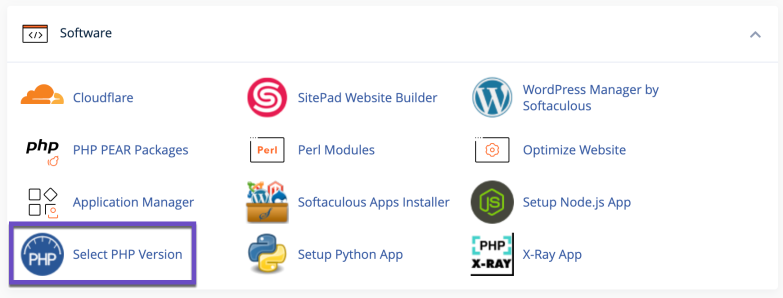
2) Look for the SOFTWARE section and click on Select PHP version
3) Click on the Options link in the new window.

4) Here you can locate the max_execution_time and type in the value that you require.
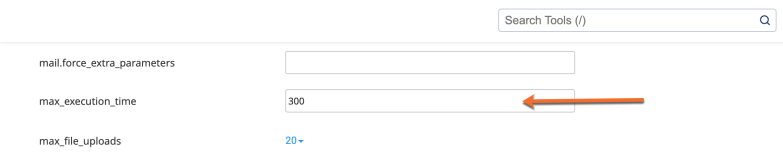
Check your script, plugin, or theme’s documentation (or an on-screen error message) to find the correct value.
Struggling with support and website problems? Tarweig is the hosting solution designed to save you time and money! 🤓 Check out our web hosting plans!
5) Once you make any changes, please do a left-hand side click anywhere outside the dropdown or text input box. If the change was successful, you will see a green box with a message confirming that the change has been applied.
That’s all! Now you know how to increase the maximum execution time of a script in cPanel.
If you enjoyed this tutorial, then you’ll love our support! All Tarweig’s hosting plans include 24/7 support from our fantastic support team. Check out our web hosting plans and have your website migrated for free today!


